
There’s an undeniable appeal to a simple, whimsical doodle. These spontaneous sketches, often reminiscent of absentminded scribbles in a notebook margin, carry a unique charm. Their wobbly lines, uncomplicated forms, and distinct personality in every stroke evoke a sense of warmth and playfulness.
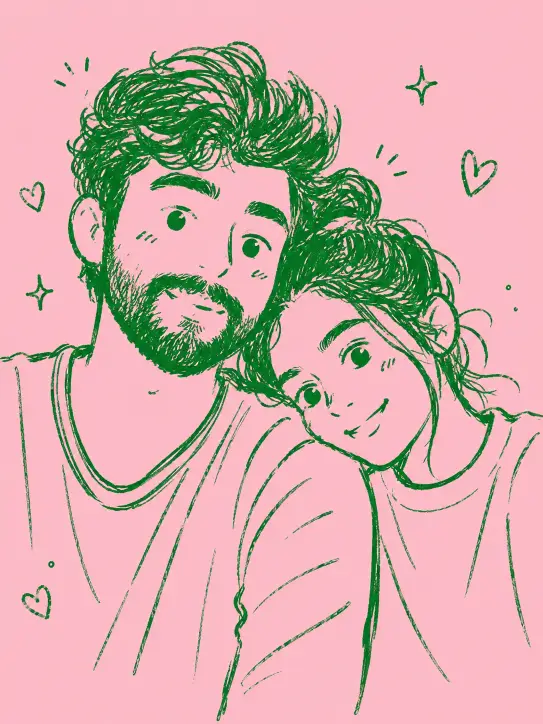
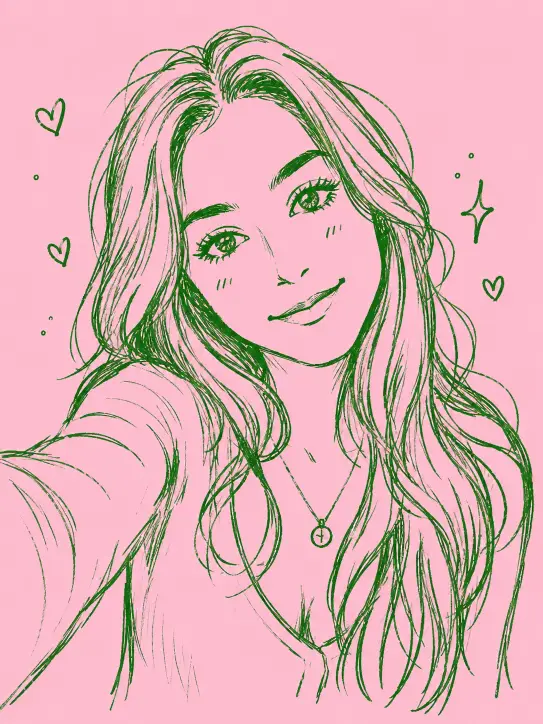
Imagine capturing that delightful, handmade aesthetic and applying it to your favorite photographs. Thanks to advanced AI models, this creative leap is now remarkably accessible. You can easily convert any ordinary picture into a distinctive, soft green, hand-drawn doodle set against a flat pink backdrop.
This article will guide you through a proven ChatGPT prompt designed to achieve precisely this effect. Whether it’s a beloved pet, a casual selfie, or even a shot of your morning coffee, you’ll learn how to give your images a charming, doodle-inspired makeover that stands out.
Key Takeaways
- Unlock the power of a specific ChatGPT prompt to turn photos into stylized doodle illustrations.
- Understand how individual elements within the prompt contribute to the final artistic output.
- Discover which types of photos yield the most captivating and aesthetically pleasing doodle results.
- Learn simple modifications to customize your doodle’s colors, backgrounds, and aspect ratios.
- Gain practical tips for optimizing your source images to ensure superior AI-generated artwork.
The Alluring Charm of AI-Generated Doodles
Hand-drawn doodles possess a quality that often feels missing in polished digital art. They embrace imperfection, celebrating asymmetry and a sense of effortless creation. This raw, authentic vibe is what makes them so universally appealing.
Now, artificial intelligence is bringing this beloved style to a broader audience. With the right instructions, AI can mimic the idiosyncratic beauty of a human sketch, making personalized art creation simpler than ever.
Unleashing Creativity: Your Photo to Doodle ChatGPT Prompt
The core of this artistic transformation lies in a carefully crafted **ChatGPT prompt for doodle illustration**. This specific prompt instructs the AI model to interpret your uploaded image and redraw it in a distinct, charming style.
Here’s the exact prompt you’ll need. Simply copy it and then upload your chosen photo within the same chat message.
Convert this photo into a playful minimalist doodle sketch. Render the subject with loose hand-drawn linework using a green brush pen, letting the strokes stay a little shaky and uneven for an organic feel. Pare everything down to soft, rounded childlike forms while keeping the original subject and layout recognizable. Aim for a casual sketchbook vibe with cheerful, cartoonish character styling, set against a flat pink backdrop. Emphasize sparse lines, easygoing simplicity, and a homemade quality, with small wonky details adding charm. Keep it loose, friendly, and effortlessly cute. Aspect ratio 3:4.
How to Use This Prompt in ChatGPT
To begin, ensure you’re using a ChatGPT interface that supports image generation capabilities. Start a new conversation, paste the entire prompt into the message box, and then use the upload button to attach your desired photograph. Once everything is ready, hit send.
ChatGPT will first analyze your uploaded image, identifying the main subject and its spatial arrangement. Following this analysis, it will proceed to redraw the scene in the specified doodle style. Typically, you’ll receive your unique illustration in under a minute.
Should the initial result not quite match your vision—perhaps it’s too intricate or overly simplistic—don’t hesitate to provide feedback. Phrases like “make the lines more wobbly” or “further simplify the background” are effective. ChatGPT can then refine the image without requiring you to re-enter the full prompt.
Deconstructing the Prompt: Why Each Element Matters
Understanding the individual components of this **ChatGPT prompt for doodle illustration** is crucial for anyone looking to experiment or fine-tune their results. Each phrase plays a specific role in shaping the final output.
Let’s break down the key instructions:
- “loose hand-drawn linework using a green brush pen”: This segment defines both the color palette and the textural quality of the lines. The “green” provides the signature aesthetic, while “brush pen” encourages varied line thickness, adding to the hand-drawn illusion.
- “shaky and uneven” and “small wonky details”: These seemingly minor terms are vital for preventing the doodle from appearing too perfect or machine-generated. They introduce the charming imperfections that are characteristic of genuine sketchbook art.
- “soft, rounded childlike forms”: This instruction guides ChatGPT to simplify complex real-world details. It transforms intricate elements into more approachable, cartoon-like shapes, ensuring the image looks like a doodle rather than a mere traced outline.
- “flat pink backdrop”: The choice of a flat pink background serves a dual purpose. It keeps the backdrop uncluttered and allows the vibrant green linework of the subject to truly stand out. Pink and green are complementary colors, ensuring visual harmony.
Ideal Candidates for Doodle Transformation
While this versatile **ChatGPT prompt for doodle illustration** can tackle almost any image, some subjects truly flourish under its artistic direction. Certain photo types naturally lend themselves to this simplified, whimsical style.
Consider these top choices for your next doodle project:
- Pets: Animal companions, especially when captured in moments of rest or play, transform beautifully. A doodle of a sleeping cat or a goofy dog often conveys a warmth that a standard photograph might miss. The simplified shapes enhance their inherent cuteness.
- Portraits and Selfies: Human faces, when rendered through this doodle style, become wonderfully expressive and friendly. The softening of features into cartoonish forms creates results that are both flattering and fun, offering a refreshing alternative to conventional profile pictures.
- Everyday Objects: Don’t underestimate the charm of mundane items. A houseplant on a windowsill, a stack of beloved books, or your favorite coffee mug can become delightful sketches. These simple illustrations are perfect for stickers, phone wallpapers, or unique digital art.
Customizing Your AI Doodle: Beyond the Basics
Think of the provided prompt as a foundation, not a rigid formula. With a few simple adjustments, you can unlock a vast array of creative variations, allowing you to tailor your doodle illustrations to specific moods or preferences.
Here are some easy ways to personalize your creations:
| Customization Option | How to Modify | Impact on Output |
|---|---|---|
| Pen Color | Swap “green” for “blue,” “black,” “warm orange,” or “purple.” | Completely alters the mood while retaining the hand-drawn aesthetic. Black on pink offers a notably clean look. |
| Background Color | Change “flat pink” to “cream,” “soft yellow,” “pale blue,” or “light gray.” | Influences the overall atmosphere and how the linework is perceived. Lighter, muted tones generally keep the focus on the doodle. |
| Aspect Ratio | Adjust “3:4” to “1:1” (square), “16:9” (widescreen), or “9:16” (portrait for phones). | Determines the final image’s shape, making it suitable for different platforms like social media posts or phone backgrounds. |
Pro Tips for Polished Results
Achieving the best possible doodle illustrations from your photos involves a few straightforward practices. Optimizing your input can significantly enhance the quality of ChatGPT’s output.
Consider these tips for consistently cleaner and more appealing results:
- Clear Subject Focus: Start with a source photo that features one prominent, obvious subject. If your image is cluttered or contains many elements, ChatGPT may struggle to identify what to prioritize, leading to a less refined doodle.
- Optimal Lighting: Even though the final doodle is simplified, a well-lit original photograph provides the AI model with clearer information about shapes, shadows, and edges. This clarity translates into more precise and confident lines in the doodle.
- Embrace Iteration: Don’t settle for the first version if it’s not perfect. These doodle styles are generated quickly, so asking for two or three variations and selecting your favorite is a cost-effective way to achieve ideal results.
Frequently Asked Questions
What is the best aspect ratio to use for a doodle illustration?
The “3:4” aspect ratio in the prompt is a good starting point, creating a portrait-oriented image. However, you can change it to “1:1” for a square social media post, “16:9” for a wider image, or “9:16” for a phone wallpaper, depending on your needs.
Can I use any photo with this ChatGPT prompt for doodle illustration?
While the prompt is quite versatile, photos with a clear, single subject and good lighting tend to produce the best and cleanest doodle results. Busy or dark images might lead to less defined or cluttered interpretations.
How long does it typically take for ChatGPT to generate the doodle?
In most cases, ChatGPT can generate your doodle illustration in under a minute. The process is usually very quick, allowing for rapid experimentation and iteration.
What should I do if the first doodle version isn’t exactly what I wanted?
Simply provide feedback to ChatGPT. You can ask for specific adjustments, such as “make the lines thicker,” “simplify the background more,” or “add more wonky details.” The AI will then revise the image based on your instructions.
Does this prompt work with all versions of ChatGPT?
This prompt is designed for ChatGPT versions that include image generation capabilities, often powered by models like DALL-E. Ensure your subscription or access includes this feature for the prompt to function correctly.
Conclusion
This straightforward **ChatGPT prompt for doodle illustration** offers a delightful gateway into personalized digital art. It transforms everyday photographs into charming, lighthearted sketches that are bound to bring a smile. The simplicity of the technique belies its powerful ability to infuse your images with a unique, handmade character.
Keep this valuable prompt readily accessible, whether for creating a whimsical sketch of a cherished pet, a unique portrait of a friend, or an artistic rendering of an object nearby. Once you begin experimenting with this engaging tool, you’ll likely find yourself captivated by the endless creative possibilities.